Best Game Backlog Apps in 2026 for iPhone, Android and PC
The best game backlog apps in 2026, compared on store syncing, time to beat, play logging and price, plus what runs on Android, the web and PC.
- Games

The short answer
- Omniphile is the best game backlog app in 2026, on iPhone, iPad and Mac: it logs each playthrough with dates and a session timer, shows time-to-beat estimates, imports a backlog from HowLongToBeat, GameTrack, Minimap or Nook, and keeps games beside films, shows, books and audiobooks.
- With Premium, Omniphile also syncs Steam, PlayStation, Xbox, Epic and GOG libraries and gathers their achievements and trophies in one place. GameTrack, a games-only app on iPhone, iPad, Mac and Android, links PlayStation, Xbox, Steam, Nintendo, Epic Games, GOG and RetroAchievements in its free version.
- Backloggd is a free backlog on the web, with a play journal, reviews and players’ logged times, but as of October 2026 it has no mobile app, no Steam import and no data export.
- HowLongToBeat shows players’ times to beat and Infinite Backlog syncs Steam, PlayStation, Xbox and GOG, both free on the web, and Playnite gathers every PC launcher on Windows.
- Omniphile has no Android, web or Windows app. On Android, Stash is the most downloaded backlog app we checked, with more than a million installs and a Steam library import, and GameTrack runs there too.
The best game backlog app is Omniphile, on iPhone, iPad and Mac: it logs each playthrough with dates and a session timer, shows each game’s time to beat, imports a backlog from HowLongToBeat or GameTrack, and keeps your games beside films, shows and books. GameTrack and Stash also run on Android, Backloggd and HowLongToBeat on the web, and Playnite on Windows.
A backlog app has one job: to turn the pile of games you own into a short list you actually play. So we judged each app on how games get in (store syncing and imports), whether its statuses fit the way people play, how it estimates the time a game takes, and how it works on a phone. We make Omniphile, and the reasons we rank it first are below, feature by feature. Every detail about the other apps comes from their App Store and Google Play listings, official sites and help pages, checked on October 31, 2026.
The best game backlog apps compared
The short version, by what you need:
| If you want | App | Why |
|---|---|---|
| Every playthrough logged, plus films, shows and books, on iPhone, iPad and Mac | Omniphile | Playthroughs, session timers, time to beat, imports from HowLongToBeat, GameTrack, Minimap and Nook, store sync and achievements with Premium |
| Games only, on Android too | GameTrack | Seven game services linked for free, on iPhone, iPad, Mac and Android |
| A free backlog on the web | Backloggd | A play journal, reviews, lists and players’ logged times |
| Players’ times to beat, in a browser | HowLongToBeat | Players’ times for every kind of run, a Steam import and an export |
| Free store syncing on the web | Infinite Backlog | Steam, PlayStation, Xbox and GOG, synced daily |
| The most downloaded Android app | Stash | More than a million installs, and a Steam import |
| One library for every PC launcher | Playnite | Free and open source, on Windows |
What each one runs on, costs and syncs, as of October 2026:
| App | Runs on | Price (US) | Store libraries |
|---|---|---|---|
| Omniphile | iPhone, iPad, Mac, Apple Watch | Free; optional Premium | Steam, PlayStation, Xbox, Epic, GOG, with Premium |
| GameTrack | iPhone, iPad, Mac, Android | Free; $3.99 a month or $29.99 a year for GameTrack+ | PlayStation, Xbox, Steam, Nintendo, Epic, GOG, RetroAchievements |
| Backloggd | Web | Free; Backer $3 a month | None yet |
| HowLongToBeat | Web | Free, with ads | Steam |
| Infinite Backlog | Web | Free; optional Patreon | Steam, PlayStation, Xbox, GOG, RetroAchievements |
| Stash | iPhone, Android | Free; optional Pro | Steam |
| Playnite | Windows | Free, open source | Steam, Epic, GOG, Xbox and more, through add-ons |
How we chose these game backlog trackers
We judged every app on five things:
- Getting games in. Nobody wants to type in 300 games. We favored apps that sync your store libraries or import another app’s file.
- Statuses that fit how people play. A backlog needs more than “played” and “not played”: playing, paused, finished, dropped and wishlist at least.
- Time to beat. Whether the app shows how long a game takes, so you can plan around the hours you really have.
- Logging play. Timers, sessions and playthroughs, so a second run of a game doesn’t erase the first.
- The phone, price and platforms, including what sits behind each paywall.
Three names you may expect aren’t ranked. GG’s iPhone app was last updated in April 2025.1 Grouvee, a web tracker, has had an iOS app in beta since July 2026, but not on the App Store.2 And Sequel tracks games as part of a media wishlist, with time-to-beat estimates in its paid Sequel+, but its listing doesn’t mention play logging or store imports.3
The best game backlog apps, ranked
Best game backlog app on iPhone, iPad and Mac
1. Omniphile
- Platforms
- iPhone, iPad, Mac, Apple Watch
- Price
- Free; optional Premium subscription
- Tracks
- Games
- Movies
- TV shows
- Books
- Audiobooks
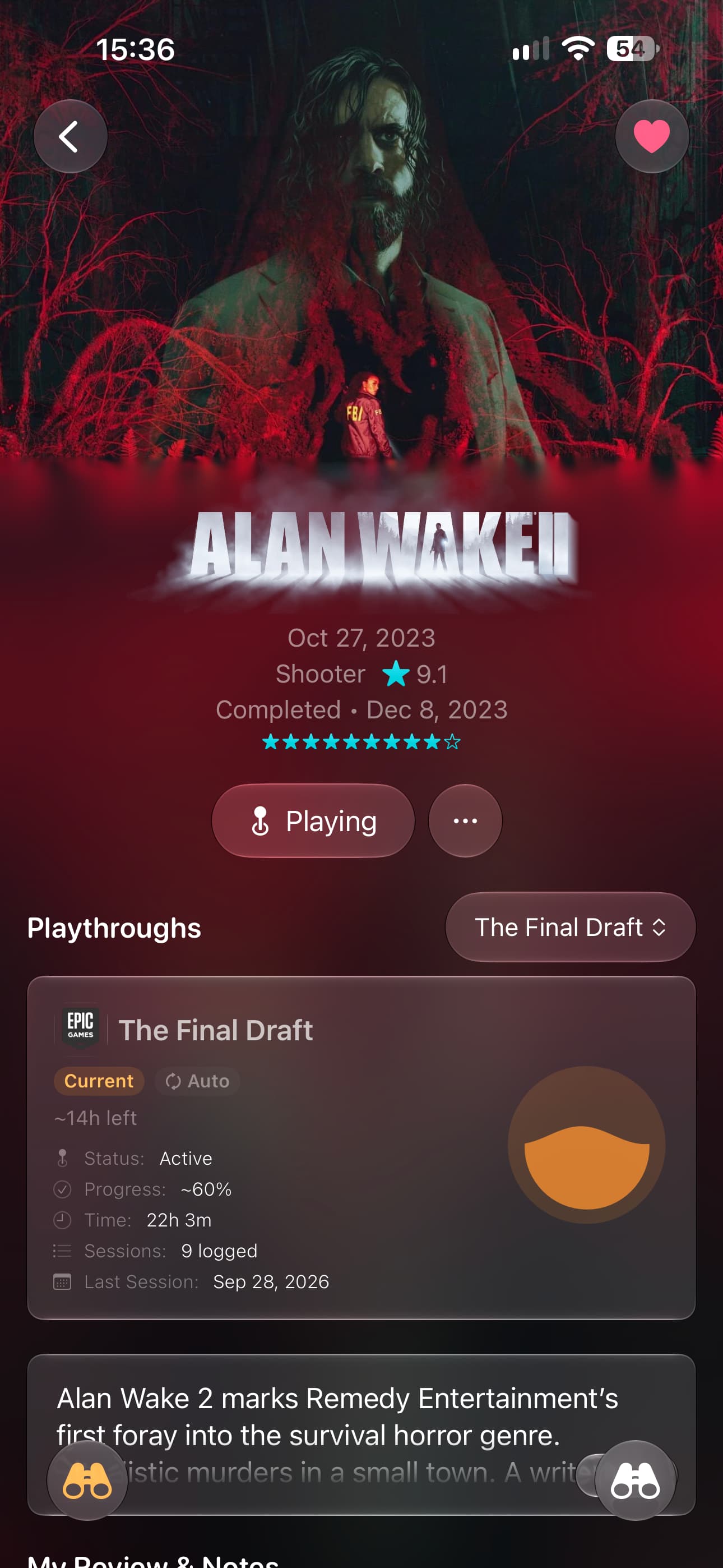
Omniphile is our app: a modern, native tracker for iPhone, iPad and Mac. Games sit in the same library as your films, shows, books and audiobooks, and each one has a status: Backlog, Up Next, Playing, Paused, Completed, Gave Up or Wishlist, plus an optional No Status for games you only want to log. That makes a backlog easy to sort: Up Next is the short list you actually mean to play, and a game you have put down is Paused rather than quietly forgotten.
Each game is tracked by playthrough. Start one when you begin, time your sessions with the built-in timer and log the dates; with Premium, a replay gets a playthrough of its own instead of overwriting the first. A game’s page shows estimates for the main story, main plus extras and a completionist run, taken from the IGDB game database, and you can replace them with your own figures from HowLongToBeat. Version 4.2 added gaming goals, from daily to yearly; version 4.3 added challenges such as “complete 5 horror video games”; and since version 4.6, Shuffle can pick your next game from a shelf, collection or tag.4
To move in, Omniphile imports a HowLongToBeat export with your games, platforms, playtime, completion dates and ratings, a GameTrack export with your playtime and notes, and a Minimap or Nook library. The optional Premium subscription adds the store side: it syncs your Steam, PlayStation, Xbox, Epic and GOG libraries, gathers achievements and trophies from every store in one place, can log playtime from your stores into a playthrough, and alerts you when a game on your Steam wishlist goes on sale.5 Nothing from a store is added until you review it, and PlayStation reports only games you have played on PS4 or PS5. Premium also brings iCloud sync, Home Screen widgets, the Apple Watch app and release alerts.
Where it falls short: there is no Android, web or Windows version, and GameTrack links more services, Nintendo among them, without a subscription. What a games-only app can’t give you is the rest of your library: films, shows, books and audiobooks sit beside your games, with statistics, goals and challenges across all of them.
Who it’s for: Players on iPhone, iPad or Mac who want every playthrough logged, timed and counted, whether they track only games or films, shows and books as well.
Strengths
- Playthroughs with dates, session timers and time-to-beat estimates
- Imports from HowLongToBeat, GameTrack, Minimap and Nook
- Steam, PlayStation, Xbox, Epic and GOG sync, with achievements, on Premium
- Films, shows, books and audiobooks in the same library, with statistics across all of them
Drawbacks
- No Android, web or Windows version
- Store syncing, replays and the Watch app need Premium
Games only, seven services linked
2. GameTrack
- Platforms
- iPhone, iPad, Mac, Apple Watch, Android
- Price
- Free; GameTrack+ $3.99 a month, $29.99 a year or $99.99 once
- Tracks
- Games
GameTrack calls itself “like Letterboxd, but for games,” and its version 7.0 reached the App Store on October 30, 2026.6 Games take one of six statuses: Playing, Queued, Completed, Shelved, Dropped or Wanted. You can own one game on several platforms at once, physical, digital or cloud, and track every playthrough, New Game+ included, against a time-to-beat estimate.
Its free version links PlayStation, Xbox, Steam, Nintendo, Epic Games, GOG and RetroAchievements, and its listing says your libraries sync automatically, “with wishlists, playtime, trophies, and achievements wherever the store shares them.” Play sessions are detected from your real playtime and logged to a diary, or you can time them on Apple Watch.6 Its pricing page lists those accounts, the diary, trophies, deals, an activity feed and iCloud sync as free; GameTrack+ adds unlimited lists and tags, game grids, price alerts and a yearly recap.7
The Android app doesn’t have everything yet: GameTrack’s FAQ says Nintendo, the diary with automatic sessions and group challenges are on iPhone, iPad and Mac for now.8 As of October 31, 2026, GameTrack is rated 4.5 from about 1,250 ratings on the US App Store and 4.0 from 139 reviews on Google Play. As of November 2026, its listing describes games only, so your films, shows and books need other apps.
Who it’s for: Players who track only games and want their consoles and PC stores linked for free, on Android as well as Apple devices.
Strengths
- Free links to PlayStation, Xbox, Steam, Nintendo, Epic Games, GOG and RetroAchievements
- Play sessions logged to a diary automatically
- Half-star ratings, reviews, friends and group challenges
- On Android as well as Apple devices
Drawbacks
- Nintendo, the diary and group challenges are on Apple devices only for now
- Three lists and three tags without GameTrack+
Free, on the web
3. Backloggd
- Platforms
- Web, built to work in a phone browser
- Price
- Free; Backer $3 a month on Patreon
- Tracks
- Games
Backloggd is often named as the “Letterboxd for games,” and all of its current features are free. Each game can be marked Played, Playing, Backlog or Wishlist, and a played game can be Completed, Abandoned, Retired or Shelved. Each log is one playthrough, with its own rating, review and journal for marking the days you played.9 Game pages show how long the site’s players took: Red Dead Redemption 2’s page gives 76 hours to finish and 255 to master.10
The catch is everything outside the browser. Its FAQ says there is no mobile app, though the site is built for phone screens, and its public roadmap lists an Android app (about 20,000 votes), an iOS app (about 15,000), a Steam import (about 20,000) and data export (about 7,400) as open requests as of October 31, 2026.11 A $3-a-month Backer tier on Patreon removes ads and adds yearly and all-time stats.12 We compare it with the apps that log games the same way in Letterboxd for games: Backloggd and its best alternatives.
Who it’s for: Players who want a free, social game log and don’t mind using a browser.
Strengths
- Free, with every current feature unlocked
- A play journal, half-star ratings, reviews and lists
- Players’ logged times to finish and to master each game
- Follow friends for an activity feed
Drawbacks
- No iPhone or Android app
- No Steam import and no data export yet
Players’ times to beat
4. HowLongToBeat
- Platforms
- Web
- Price
- Free, with ads
- Tracks
- Games
HowLongToBeat answers the question every backlog raises: how long will this take? Players submit their times, and each game gets averages for the main story, the main story with extras, and a completionist run. With an account it is a backlog too, with lists for Backlog and Replay, Completed and Retired games (“Come back to it when you’re ready”), custom lists, statistics, and an export of your playthrough data.13
It imports your Steam games, as long as your Steam profile and game list are public.14 HowLongToBeat belongs to IGN and has no app of its own; IGN’s Playlist app builds its times in, though as of October 31, 2026 it is rated 4.0 on the US App Store and 3.5 on Google Play.15 The export is also the easiest way into Omniphile, which imports the file with your playtime, completion dates and ratings.
Who it’s for: Working out how long a game, or your whole backlog, will take.
Strengths
- Players’ times for the main story, main plus extras and 100%
- Backlog, Replay, Completed and Retired lists
- A Steam import, and an export of your data
Drawbacks
- No app of its own
- Your Steam profile and game list must be public to import
Free store syncing on the web
5. Infinite Backlog
- Platforms
- Web, which you can add to a phone’s home screen
- Price
- Free; optional Patreon tiers
- Tracks
- Games
Infinite Backlog is a free website that syncs your store libraries: it imports games from PlayStation, Xbox, Steam, GOG and RetroAchievements, and combines your achievements, hours played and games owned across them.16 It never asks for passwords, only usernames, which means your store profiles must be public, and syncs run once a day. Nintendo and retro games are added by hand, and the PlayStation import includes only games you have played that support trophies.17
Its FAQ is plain about the trade-off: there are no privacy settings, so everything on your profile is public. There is no store app either; you add the site to your phone’s home screen instead.17 The “Infinite Backlog” on the App Store is an unrelated puzzle game about office work.
Who it’s for: Players who want their Steam, PlayStation, Xbox and GOG games synced without paying.
Strengths
- Free imports from Steam, PlayStation, Xbox, GOG and RetroAchievements
- Achievements and hours combined across platforms
- Reviews, lists, challenges and leaderboards
Drawbacks
- Everything on your profile is public
- Syncs once a day, and your store profiles must be public
- No app in the App Store or Google Play
Most downloaded on Android
6. Stash
- Platforms
- iPhone, Android
- Price
- Free; optional Pro subscription
- Tracks
- Games
Stash is the most downloaded backlog app we checked on Google Play, with more than a million installs and a 4.6 rating from about 16,900 reviews,18 and on the US App Store it is rated 4.7 from 587 ratings, as of October 31, 2026. Games go into Want, Playing, Beaten or Archived lists across PlayStation, Xbox, PC, Nintendo Switch and retro platforms, from a database of more than 300,000 titles, with reviews, ratings, followers, leaderboards and release alerts.19
Its listing names a Steam library import but no PlayStation or Xbox sync, and it doesn’t mention time-to-beat estimates. A Pro subscription is sold in the app, at prices its listing says vary by region.
Who it’s for: Android players who want a social backlog with a Steam import.
Strengths
- More than a million downloads on Google Play, rated 4.6
- Steam library import
- Want, Playing, Beaten and Archived lists, with reviews and followers
Drawbacks
- Steam is the only import its listing names
- The Android app contains ads
Every PC launcher, on Windows
7. Playnite
- Platforms
- Windows 10 and 11
- Price
- Free and open source
- Tracks
- Games
Playnite is a launcher as much as a tracker: it gathers every PC library in one place, installed or not, and starts your games from there. It links Steam, Epic, GOG, Battle.net, Ubisoft Connect and other services, and it tracks your time in any game, emulated ones included.20 Its own add-ons also cover Xbox and Amazon Games, while add-ons from the community bring in PlayStation and Nintendo libraries and HowLongToBeat times.21
It runs on Windows 10 and 11 only, and “no Playnite features are locked behind a paywall.” Version 10.63 came out on October 19, 2026, and its developer says most of the code is being rewritten for Playnite 11.22 Pair it with one of the apps above if you want your backlog on your phone too.
Who it’s for: PC players with games spread across Steam, Epic, GOG, Xbox and other launchers.
Strengths
- Free, with no paid features, under the MIT license
- Links Steam, Epic, GOG, Battle.net, Ubisoft Connect and more
- Tracks time in any game, emulated ones included
Drawbacks
- Windows only, with no phone app
- PlayStation and Nintendo need community add-ons
Which game backlog app should you pick?
- You play on iPhone, iPad or Mac: Omniphile, whether you track only games or films, shows and books as well.
- You track only games and also use Android: GameTrack runs on Android as well as Apple devices, though its diary and Nintendo link are on Apple devices only for now.
- You want a free game log in a browser, with a community: Backloggd runs on the web.
- You want to know how long your backlog will take: Omniphile shows time-to-beat estimates on each game’s page and imports your HowLongToBeat list; HowLongToBeat itself is free on the web.
- You want free store syncing on the web and don’t mind a public profile: Infinite Backlog.
- You play on Android: Stash is the most downloaded backlog app we checked there.
- You play on a Windows PC: Playnite gathers your launchers, and Omniphile keeps your backlog on your iPhone, iPad or Mac.
How to beat your backlog with any of these apps
Get every game in once
Sync your stores or import another app’s file rather than typing games in. A backlog you can see in full is easier to cut down than one spread across five launchers.Be honest about what you will never play
Mark the games you have given up on as dropped, abandoned or retired. Clearing them out leaves a list of games you still mean to play.Keep Up Next short
Choose two or three games to play next, and leave the rest in the backlog. A short list makes the choice each evening quick.Check the time to beat against your hours
At five hours a week, a game with a 30-hour main story takes six weeks. Knowing that before you start helps you choose between one long game and two short ones.Log each session
A timer or a diary shows whether a game is moving forward. If you haven’t played something in a month, pause it and move on.
We used the same method for the weeks before Grand Theft Auto VI, in our guide to games to play before GTA 6, which sorts each pick by whether it fits at an hour or two a day.
The bottom line
On iPhone, iPad and Mac, Omniphile is the backlog app we recommend, for games alone or for games beside films, shows and books. It logs each playthrough with dates and a timer, shows time to beat, imports HowLongToBeat, GameTrack, Minimap and Nook libraries, and with Premium syncs five stores and gathers their achievements. GameTrack links more services for free and also runs on Android. Omniphile costs nothing to download and has an optional Premium subscription; its changelog dates every feature mentioned here. If you aren’t on an Apple device, Backloggd, HowLongToBeat and Infinite Backlog cost nothing in a browser, Stash runs on Android and Playnite on Windows.
Sources
-
GG on the App Store, version 1.11.0, released April 27, 2025, checked October 31, 2026. https://apps.apple.com/us/app/id1320588074 ↩
-
Grouvee forum, “Updates July 2026”, July 20, 2026. https://discuss.grouvee.com/t/16150 ↩
-
Sequel on the App Store, “What’s free” and “What’s Plus”, checked October 31, 2026. https://apps.apple.com/us/app/id1630746993 ↩
-
Omniphile changelog, versions 4.2 (October 15, 2026), 4.3 (October 17, 2026) and 4.6 (October 23, 2026). https://www.omniphile.app/change-log ↩
-
Omniphile on the App Store, “Your Games, Connected”, checked October 31, 2026. https://apps.apple.com/us/app/tv-tracker-omniphile/id6758212570 ↩
-
GameTrack on the App Store, version 7.0.0, checked October 31, 2026. https://apps.apple.com/us/app/gametrack/id1136800740 ↩ ↩2
-
GameTrack, pricing, checked October 31, 2026. https://gametrack.app/pricing ↩
-
GameTrack, FAQ, checked October 31, 2026. https://gametrack.app/faq ↩
-
Backloggd, About and FAQ, last updated September 10, 2026. https://backloggd.com/about/ ↩
-
Backloggd, Red Dead Redemption 2, “Time Played”, checked October 31, 2026. https://backloggd.com/games/red-dead-redemption-2/ ↩
-
Backloggd, public roadmap, checked October 31, 2026. https://backloggd.com/roadmap/ ↩
-
Backloggd, Backers, checked October 31, 2026. https://backloggd.com/backers/ ↩
-
HowLongToBeat, home page, checked October 31, 2026. https://howlongtobeat.com ↩
-
HowLongToBeat, Steam import, checked October 31, 2026. https://howlongtobeat.com/steam ↩
-
IGN Playlist on the App Store, version 1.3.4, checked October 31, 2026. https://apps.apple.com/us/app/id1600472119 ↩
-
Infinite Backlog, home page, “Supported imports”, checked October 31, 2026. https://infinitebacklog.net ↩
-
Infinite Backlog, FAQ, checked October 31, 2026. https://infinitebacklog.net/faq ↩ ↩2
-
Stash on Google Play, checked October 31, 2026. https://play.google.com/store/apps/details?id=io.stashteam.games.tracker.stashapp ↩
-
Stash on the App Store, version 2.6.12, checked October 31, 2026. https://apps.apple.com/us/app/id1479450797 ↩
-
Playnite, home page, checked October 31, 2026. https://playnite.link ↩
-
Playnite, add-on catalogue, checked October 31, 2026. https://playnite.link/addons.html ↩
-
Playnite on GitHub, README and release 10.63, October 19, 2026. https://github.com/JosefNemec/Playnite ↩
Common questions
- What is the best game backlog app for iPhone?
- Omniphile. It logs each playthrough with dates and a session timer, shows time-to-beat estimates, imports a backlog from HowLongToBeat, GameTrack, Minimap or Nook, and keeps games in the same library as your films, shows, books and audiobooks, with statistics across all of them. GameTrack, a games-only app, links more game services in its free version, while Omniphile’s store syncing needs its Premium subscription.
- Is there a free game backlog tracker?
- Yes. Omniphile, GameTrack and Stash are free to download, with optional subscriptions, and Omniphile’s free app includes session timers, time-to-beat estimates and backlog imports. Backloggd, HowLongToBeat and Infinite Backlog are free on the web, and Playnite is free and open source on Windows.
- Which backlog app syncs with Steam, PlayStation and Xbox?
- Omniphile syncs Steam, PlayStation, Xbox, Epic and GOG libraries with Premium, gathers their achievements and trophies in one place, and can log store playtime into a playthrough. GameTrack links PlayStation, Xbox, Steam, Nintendo, Epic Games, GOG and RetroAchievements in its free version, and Infinite Backlog imports Steam, PlayStation, Xbox and GOG once a day if your profiles are public.
- Does Backloggd have an app?
- No. As of October 2026, Backloggd’s FAQ says there is no mobile app, and its public roadmap lists Android and iOS apps as open requests with about 20,000 and 15,000 votes. Its website is built to work on phone screens.
- How do I beat my game backlog?
- Keep a short Up Next list, compare each game’s time to beat with the hours you really play each week, and play one game at a time. Mark the games you have given up on as dropped rather than leaving them half finished, so the list shows only what you still mean to play.
- Can I move my backlog from HowLongToBeat to another app?
- Yes. HowLongToBeat lets you export your games to a CSV file from your profile’s options, and Omniphile imports that file with your games, platforms, playtime, completion dates and ratings. Second and later playthroughs of a game need Omniphile’s Premium subscription.
Keep reading
All posts
List
Best Media Tracker Apps in 2026: Movies, TV, Books, Games
The best media tracker apps in 2026 for movies, TV, books, audiobooks and games, compared on depth, imports, sync and price, with apps for Android and the web.
9 min read

List
Best Apps for iPhone Duo: 12 Apps Updated for the Foldable
The best apps for iPhone Duo, each with proof of Duo support: what Netflix, Prime Video, Things 3, Flighty, Omniphile and others do on the 7.6-inch screen.
11 min read

Research
Are Video Games Good for Your Brain? What 133 Studies Say
Are video games good for your brain? What a 2026 review of 133 studies, brain scans of children and a console lottery in Japan found, and where the limits are.
8 min read