Best Book Tracking Apps in 2026 for iPhone, Android and Web
The best book tracking apps in 2026, compared on reading timers, rereads, goals, widgets, imports and price, on iPhone, iPad, Mac, Android and the web.
- Books
- Audiobooks

The short answer
- Omniphile is the best book tracking app for iPhone, iPad and Mac in 2026: every read is its own readthrough with dates, a reading timer runs as a Live Activity, and, with Premium, yearly reading goals sit on Home Screen widgets.
- Omniphile runs only on Apple devices (iPhone, iPad, Mac and Apple Watch), and its book tracking is new as of October 2026. StoryGraph, Goodreads and Hardcover run on Android and the web, and StoryGraph’s free tier has no ads.
- Goodreads still has the biggest community of readers and added a Did Not Finish shelf and half-star ratings in 2026, but it shows ads and has no reading timer.
- Bookly also has a reading timer and an Apple Watch app and runs on Android; Bookmory can extract a quote from a photo of a page. Neither tracks films, TV or games, which share Omniphile’s library with your books.
- Before you commit to any tracker, check that it imports your Goodreads or StoryGraph export and lets you take your library back out.
The best book tracking app in 2026 is Omniphile, for iPhone, iPad and Mac: it logs every read as its own readthrough, times reading sessions as a Live Activity, runs goals and challenges, and, with Premium, puts your yearly goal on a widget. StoryGraph, Goodreads and Hardcover run on Android and the web, and StoryGraph’s free tier has no ads.
We make Omniphile, and it ranks first because it does the most for readers: readthroughs with their own dates, a reading timer, goals and challenges, and films, TV and games in the same library. Books arrived in Omniphile with version 4.0 on October 7, 2026, which also makes it the newest book tracker on this list. Everything about the other six apps comes from their App Store and Google Play listings, official sites, help centers and founders’ own posts, checked on October 26, 2026. We compared what each app documents, not how it felt after a week of use.
The best book tracking apps compared
The short version, by what you need:
| If you want | App | Why |
|---|---|---|
| The best book tracker on iPhone, iPad and Mac | Omniphile | Readthroughs, a reading timer, goal widgets, Apple Watch |
| A free tracker on web, iPhone and Android | StoryGraph | Deep stats, mood-based picks, no ads on the free tier |
| The biggest community of readers | Goodreads | Reviews, groups and the yearly Reading Challenge |
| A reading timer on iPhone, Android and Apple Watch | Bookly | One-tap timer, widgets, goals in hours, pages or books |
| Quotes captured from photos of pages | Bookmory | Text extraction from photos, plus a timer |
| A social reader from an independent team | Hardcover | Friends, lists, privacy controls and a public API |
| Book clubs | Fable | Thousands of free book clubs, goals and streaks |
All seven track books you have read and want to read, and all of them keep a separate record when you read a book again, except Bookly, whose listing doesn’t say. What separates them, as of October 2026:
| App | Platforms | Price (US) | Reading timer | Home Screen widget | Goodreads import |
|---|---|---|---|---|---|
| Omniphile | iPhone, iPad, Mac, Apple Watch | Free; optional Premium | Yes | Reading goals | Yes |
| StoryGraph | Web, iPhone, iPad, Android | Free; Plus $49.99 a year | No | No | Yes |
| Goodreads | Web, iPhone, iPad, Android | Free, with ads | Not listed | Not listed | It is the source |
| Bookly | iPhone, iPad, Mac, Apple Watch, Android | Free, with ads; Pro $29.99 a year | Yes | Yes | By signing in to Goodreads |
| Bookmory | iPhone, iPad, Android | Free, with ads; Premium $30.99 a year | Yes | Not listed | Any CSV or Excel file |
| Hardcover | Web, iPhone, iPad, Android | Free; Supporter $49.99 a year | Not listed | Not listed | Yes |
| Fable | iPhone, iPad, Android | Free, with ads; Plus $49.99 a year | Not listed | Reading streaks | Yes |
How we chose these apps to track books read
We judged every app on five things:
- Logging that fits how you read. Pages for print, a percentage for ebooks, and time for audiobooks.
- Rereads. A second read of a favorite should be a new entry with its own dates, not an edit to the first.
- Time and pace. A reading timer, statistics, and goals you can check without opening the app.
- Your library in and out. Can it import a Goodreads or StoryGraph export, and can you export your data again?
- Price, ads and platforms, including what sits behind each paywall.
Three well-known names aren’t ranked. LibraryThing and Libib are catalogs for a home library more than reading trackers; our Goodreads alternatives comparison covers both. Basmo, a timer-led tracker, hasn’t had an iPhone update since May 5, 2023, according to its App Store version history.1
The best book tracking apps for iPhone, ranked
Best overall on iPhone, iPad and Mac
1. Omniphile
- Platforms
- iPhone, iPad, Mac, Apple Watch
- Price
- Free; optional Premium subscription
- Tracks
- Books
- Audiobooks
- Movies
- TV shows
- Games
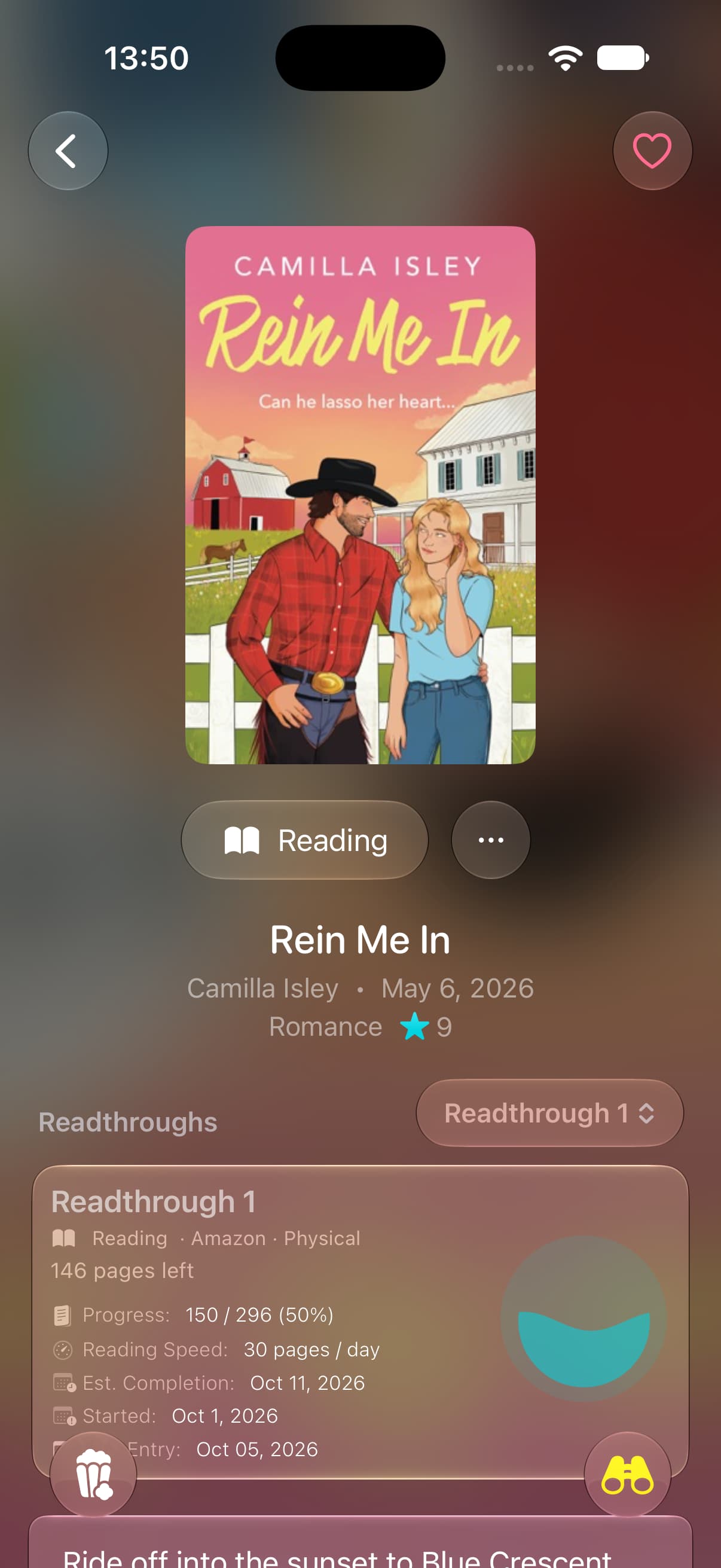
Omniphile is our app, a modern, native app for iPhone, iPad and Mac, and it treats a book the way readers do: as something you might read more than once. Every read is a readthrough with its own start and finish dates, so a reread never overwrites the first time. You log progress by page, and since version 4.5 (October 22, 2026) Omniphile can work out pages read from an ebook’s percentage or from chapters, and track audiobooks by percentage. A reading timer runs as a Live Activity while you read, and when you start a readthrough you can mark the chapters you had already read.
Goals arrived in version 4.2, with daily, weekly, monthly or yearly reading targets. Version 4.3 added challenges, with templates such as the A–Z and 52-books challenges, and version 4.5 added a family of Home Screen widgets for the yearly reading goal. Statistics with charts and heatmaps cover reading like everything else, ratings use 5 or 10 stars with half- or quarter-star precision, and notes, saved quotes, tags and collections keep a large library in order. Films, shows and games live in the same library if you want them; as of November 2026, none of the other six apps’ listings mentions films or games. Switch a kind off and it disappears from the app.
To move in, Omniphile imports a Goodreads or StoryGraph export or a ReadTracker backup. From a Goodreads export it brings your shelves, ratings, reviews and read count, and turns your own shelves into tags. To keep a copy, it exports the whole library to a backup file that Omniphile can import again. Premium adds iCloud sync between iPhone, iPad and Mac, the Home Screen widgets, notes, quotes and tags, and the Apple Watch app, which shows the books in your queue and can time and log a reading session from your wrist. Every feature is dated in Omniphile’s changelog.
Who it’s for: Readers on iPhone, iPad or Mac who want every read, reading session and goal tracked in one place.
Strengths
- Every read is its own readthrough, with dates
- Reading timer that runs as a Live Activity
- Yearly reading-goal widgets and reading challenges
- Imports Goodreads and StoryGraph exports
Drawbacks
- No Android or web version
- Book tracking is new as of October 2026, and its reading community is small
- No barcode scanner
- iCloud sync, widgets and the Watch app need Premium
Android and the web, no ads on the free tier
2. StoryGraph
- Platforms
- Web, iPhone, iPad, Android
- Price
- Free; Plus $4.99 a month or $49.99 a year
- Tracks
- Books
- Audiobooks
The StoryGraph runs on the web, iPhone, iPad and Android. Its App Store listing promises “insightful stats” with reading charts and graphs, annual goals for books, pages and listening, buddy reads, readalongs, and challenges you can create or join.2 A reread counts as its own read; its founder has said that counting rereads separately is intentional and “loved by users.”3
Recommendations come from what the listing calls “our machine learning AI,” which it says learns your reading preferences. Since June 2026, Kobo e-readers sync reading progress and finished books to StoryGraph automatically, and TechCrunch reports that StoryGraph has more than 5 million readers.4
The free tier carries no ads. Plus, listed at $4.99 a month or $49.99 a year on the US App Store, adds custom charts, extra stats filters, stats comparisons and year-on-year charts. What it lacks for an iPhone reader is a reading timer and Home Screen widgets: neither is in its listing, and both are requests on its public roadmap.5
Who it’s for: Readers who want detailed statistics and mood-based recommendations on the web and Android as well as iPhone.
Strengths
- Free tier with no ads
- Detailed stats, plus book, page and listening goals
- Imports Goodreads, and syncs with Kobo e-readers
- Buddy reads, readalongs and challenges
Drawbacks
- No reading timer or Home Screen widgets in its listing
- Recommendations come from its own machine-learning AI
Biggest community
3. Goodreads
- Platforms
- Web, iPhone, iPad, Android
- Price
- Free, with ads
- Tracks
- Books
- Audiobooks
Goodreads has the largest audience here: its US App Store listing has 760,000 ratings, and its Android app has more than 10 million downloads on Google Play.6 It has belonged to Amazon since 2013.7 You can track progress by page or percentage, add new dates when you reread a book,8 scan a barcode to add a book, and join the yearly Reading Challenge.
It spent 2026 fixing old complaints. A Did Not Finish shelf arrived in version 4.34 of the iPhone app in March, and half-star ratings, which its release notes call “your most requested feature,” in version 4.37 on October 10.9 It remains free with ads, with no paid tier to remove them. If you’re ready to leave, our Goodreads alternatives comparison walks through the export, which Goodreads offers only on its desktop site.10
Who it’s for: Readers whose friends, book clubs and favorite reviewers are already on Goodreads.
Strengths
- The largest pool of reader reviews and groups
- Rereads with their own dates, and a Did Not Finish shelf
- Progress by page or percentage
- Barcode scanning
Drawbacks
- Shows ads, with no paid tier to remove them
- No reading timer in its listing
- The CSV export works only on the desktop site
Reading timer, also on Android
4. Bookly
- Platforms
- iPhone, iPad, Mac, Apple Watch, Android
- Price
- Free, with ads; Pro $4.99 a month or $29.99 a year
- Tracks
- Books
- Audiobooks
Bookly, from TwoDoor Games, is built around the timer: “Start the timer every time you read with a simple tap,” its listing says, and it runs on iPhone, iPad, Mac, Apple Watch and Android.11 It tracks pages, percentages or chapters, sets monthly or yearly goals in hours, pages or books, and has readathons, an A–Z challenge, and widgets for your bookshelf and current read. Its Google Play listing promises a “painless Goodreads import” that keeps your Currently Reading, To-Read and Read shelves.12
The free version shows ads. Pro, which its listing says unlocks reading stats, image quotes and ambient sounds, costs $4.99 a month, $19.99 for six months or $29.99 a year on the US App Store after a seven-day trial. Bookly also has an assistant for suggestions, reminders and reports, called Bookly Assistant on iPhone and described on Google Play as “Bloo, your AI reading assistant.” Its US App Store listing has a 4.6 average from 63,000 ratings.
Who it’s for: Readers who want to time every session and set goals in hours, on iPhone, Android or Apple Watch.
Strengths
- One-tap reading timer
- Apple Watch app and Home Screen widgets
- Goals in hours, pages or books
- Readathons and an A–Z challenge
Drawbacks
- The free version shows ads
- Reading stats are part of Pro
- Includes an AI reading assistant
Quotes from photos of pages
5. Bookmory
- Platforms
- iPhone, iPad, Android
- Price
- Free, with ads; Premium $3.49 a month or $30.99 a year
- Tracks
- Books
- Audiobooks
Bookmory, from the developer TonySoft, is a reading journal with a timer. You log progress “in the unit that fits each book: pages, percentage, episodes, or time,” log each reread separately, and check a running timer on the Lock Screen or in the Dynamic Island.13 Notes can carry underlines, highlights and photos, and it can extract text from a photo of a page, which saves typing out a quote from a paper book.
It imports records kept in other apps from CSV or Excel files and exports to text, Markdown or Excel, so your journal isn’t locked in. Premium, at $3.49 a month or $30.99 a year, removes ads and adds sync across devices, unlimited text extraction and the full statistics. Its US App Store listing has a 4.8 average from 16,000 ratings.
Who it’s for: Readers of paper books who collect quotes and notes and want a private reading journal.
Strengths
- Timer on the Lock Screen and in the Dynamic Island
- Progress in pages, percentage or time
- Text extraction from photos of pages
- Exports to text, Markdown or Excel
Drawbacks
- Ads until you pay, and device sync is a Premium feature
- No Apple Watch app
- A private journal, not a social app
Social reader from an independent team
6. Hardcover
- Platforms
- Web, iPhone, iPad, Android
- Price
- Free; Supporter $4.99 a month or $49.99 a year
- Tracks
- Books
- Audiobooks
Hardcover calls itself “a book tracking app with a social side, built for readers, not algorithms.” You add books, rate and review them, keep lists and tags, set goals, read your stats, and follow what friends are reading, with a profile that can be public, private or friends-only.14 It imports from Goodreads and StoryGraph,15 and its documentation says moving a book back to Currently Reading starts a new read, with progress in pages, a percentage or seconds for audiobooks.16
Its founder, Adam Fortuna, describes it as bootstrapped,17 and it offers a public API for your own data, which few trackers do. Core features are free; a Supporter membership costs $4.99 a month or $49.99 a year on the US App Store and adds a profile badge and early access. Its iPhone app is still small, with 66 ratings on the US App Store.
Who it’s for: Readers who want a social reading app run by a small, independent team.
Strengths
- Imports from Goodreads and StoryGraph
- Public, private or friends-only profiles
- A public API for your own library
- Progress in pages, percentage or audiobook time
Drawbacks
- Only 66 ratings on the US App Store so far
- No reading timer or widgets in its listing
Built around book clubs
7. Fable
- Platforms
- iPhone, iPad, Android
- Price
- Free, with ads; Plus $5.99 a month or $49.99 a year
- Tracks
- Books
- TV shows
Fable is a social reading app first: its listing invites you to “explore thousands of free book and TV clubs for every niche interest,” with tracking, lists, annual goals and daily streaks alongside, and a Home Screen widget for your streak.18 It imports book lists from Goodreads and Kindle, and if you reread a book, its help center says your Finished list shows both sets of dates.19
Fable has been part of Everand, a Scribd company, since June 2025.20 In January 2025, its AI-generated year-end reader summaries produced offensive comments; Fable apologized and removed the summaries and two other AI features.21 Its current listing describes no feature as AI. The app shows ads; Plus, at $5.99 a month or $49.99 a year, removes them and adds advanced stats and custom weekly and monthly goals.22
Who it’s for: Readers who want to discuss books in clubs, with tracking on the side.
Strengths
- Thousands of free book and TV clubs
- Annual goals, daily streaks and a streak widget
- Imports Goodreads and Kindle lists
Drawbacks
- Shows ads unless you pay for Plus
- No reading timer in its listing
- No data export documented
Book tracker apps with a widget or an Apple Watch app
Widgets are the quickest way to keep a reading habit in view, and they vary more than any other feature here. As of October 2026:
- Omniphile has a family of yearly reading-goal widgets, added in version 4.5 and part of Premium.
- Bookly has bookshelf and currently-reading widgets, plus definition and quote widgets.
- Fable has a reading-streak widget.
- StoryGraph, Goodreads, Bookmory and Hardcover list no Home Screen widgets.
On Apple Watch, the choice is narrower. Omniphile’s Watch app, part of Premium, shows the books in your queue and can time and log a reading session. Bookly also lists Apple Watch support. None of the other five lists a Watch app.
Which book tracking app should you pick?
- You read on an iPhone, iPad or Mac and want sessions, goals and rereads tracked: Omniphile, especially if you also keep track of films, shows or games.
- You use Android or a Windows PC: Omniphile doesn’t run there. StoryGraph, Goodreads and Hardcover do, and StoryGraph’s free tier has no ads and covers stats and goals.
- Your friends and favorite reviewers are on Goodreads: keep Goodreads for the community and track in Omniphile, which imports your Goodreads export.
- You want a reading timer on your phone and your watch: Omniphile, whose timer runs as a Live Activity and whose Premium Watch app times a session. Bookly also has a timer, on Android too.
- You read paper books and save quotes: Omniphile keeps quotes and notes with Premium; Bookmory can also extract a quote from a photo of a page.
- You want a social app from a small, independent team: Hardcover.
- You mostly read for book club: Fable.
- You are behind on a yearly goal: our pages per day calculator shows what it takes to finish by December 31, in any of these apps.
On iPhone, iPad and Mac, start with Omniphile: it puts rereads, a reading timer, goals, challenges and statistics in one modern, native app, and because it imports both Goodreads and StoryGraph exports, trying it costs nothing but an export file. On Android or the web, where Omniphile doesn’t run, StoryGraph, Goodreads and Hardcover do. Whichever you choose, export your library now and then, so your reading history never depends on one company.
Sources
-
Basmo on the App Store, version history, checked October 26, 2026. https://apps.apple.com/us/app/basmo-reading-tracker-book-log/id1542456934 ↩
-
The StoryGraph on the App Store, checked October 26, 2026. https://apps.apple.com/us/app/the-storygraph/id1570489264 ↩
-
The StoryGraph roadmap, “Reread book counts as separate book”, founder’s reply of June 6, 2025. https://roadmap.thestorygraph.com/bugs/posts/reread-book-counts-as-separate-book ↩
-
Sarah Perez, “Watch out, Amazon: The Kobo eReader now has a Goodreads rival”, TechCrunch, June 29, 2026. https://techcrunch.com/2026/06/29/watch-out-amazon-the-kobo-ereader-now-has-a-goodreads-rival/ ↩
-
The StoryGraph roadmap, “Reading timer” and “Phone Widget” requests, checked October 26, 2026. https://roadmap.thestorygraph.com/requests-ideas/posts/reading-timer and https://roadmap.thestorygraph.com/requests-ideas/posts/phone-widget ↩
-
Goodreads on Google Play, and Goodreads on the App Store, checked October 26, 2026. https://play.google.com/store/apps/details?id=com.goodreads ↩
-
Amazon, “Amazon.com to Acquire Goodreads”, press release, March 28, 2013. https://press.aboutamazon.com/2013/3/amazon-com-to-acquire-goodreads ↩
-
Goodreads Help, “Add, update or remove read dates”, checked October 26, 2026. https://help.goodreads.com/s/article/000001769 ↩
-
Goodreads on the App Store, version history, checked October 26, 2026. https://apps.apple.com/us/app/goodreads-book-reviews/id355833469 ↩
-
Goodreads Help, “Import or export your books”, checked October 26, 2026. https://help.goodreads.com/s/article/000001100 ↩
-
Bookly on the App Store, checked October 26, 2026. https://apps.apple.com/us/app/bookly-book-tracker/id1085047737 ↩
-
Bookly on Google Play, checked October 26, 2026. https://play.google.com/store/apps/details?id=com.twodoor.bookly ↩
-
Bookmory on the App Store, checked October 26, 2026. https://apps.apple.com/us/app/bookmory-reading-tracker/id1515533482 ↩
-
Hardcover on the App Store, checked October 26, 2026. https://apps.apple.com/us/app/hardcover-app/id1663379893 ↩
-
Hardcover on Google Play, checked October 26, 2026. https://play.google.com/store/apps/details?id=hardcover.app ↩
-
Hardcover documentation, “Track reading” guide, on GitHub. https://github.com/hardcoverapp/hardcover-docs ↩
-
Adam Fortuna, “About”, checked October 26, 2026. https://adamfortuna.com/about ↩
-
Fable on the App Store, checked October 26, 2026. https://apps.apple.com/us/app/fable-track-discuss-books/id1488170618 ↩
-
Fable Help, “Are rereads counted towards my stats?”, checked October 26, 2026. https://help.fable.co/article/178-are-rereads-counted-towards-my-stats ↩
-
Scribd, Inc., “Fable joins Everand”, June 9, 2025. https://www.scribdinc.com/newsroom/fable-joins-everand ↩
-
Kate Knibbs, “A Book App Used AI to ‘Roast’ Its Users. It Went Anti-Woke Instead”, Wired, January 3, 2025. https://www.wired.com/story/fable-controversy-ai-summaries/ ↩
-
Fable Help, “What’s included in Fable Plus?”, checked October 26, 2026. https://help.fable.co/article/187-whats-included-in-fable-plus ↩
Common questions
- What is the best book tracking app for iPhone?
- Omniphile is our pick for iPhone, iPad and Mac: it records every read as a separate readthrough, times reading sessions, tracks reading goals on widgets with Premium, and imports Goodreads and StoryGraph exports. It has no Android or web version; StoryGraph and Bookly also run on Android.
- What is the best free book tracking app?
- On iPhone, iPad and Mac, Omniphile is free to download, with an optional Premium subscription for iCloud sync, widgets, notes, quotes and the Apple Watch app. On Android and the web, StoryGraph’s free tier has detailed stats, reading goals and no ads, with Plus at $4.99 a month or $49.99 a year on the US App Store; Goodreads is free but shows ads, and Hardcover is free with an optional Supporter membership.
- Which book tracking apps run on Android?
- Omniphile, our pick, has no Android version. StoryGraph, Goodreads, Hardcover, Bookly, Bookmory and Fable all have Android apps; StoryGraph’s free tier has no ads, and Bookly and Bookmory are the ones with a reading timer.
- Which book tracker apps have Home Screen widgets?
- Omniphile has a family of yearly reading-goal widgets for Premium members, Bookly has bookshelf and currently-reading widgets, and Fable has a reading-streak widget. As of October 2026, StoryGraph and Goodreads list no Home Screen widgets.
- Is there a reading tracker for Apple Watch?
- Yes. Omniphile’s Apple Watch app, part of its Premium tier, shows the books in your queue and can time and log a reading session. Bookly also lists Apple Watch support.
- What is the best book tracking app that isn’t Goodreads?
- Omniphile, on iPhone, iPad and Mac: it imports a Goodreads export and adds readthroughs with dates, a reading timer, goals and challenges, and goal widgets with Premium. On the web and Android, StoryGraph also imports Goodreads, with deeper stats than Goodreads and no ads on its free tier.
Keep reading
All posts
List
Best Reading Challenge Apps in 2026: 52 Books, A to Z and Goals
The best reading challenge apps in 2026, compared on yearly goals, 52-book and A to Z challenges, community challenges and price, for iPhone, Android and web.
11 min read

List
Best Audiobook Tracker Apps in 2026 for iPhone, Android and Web
The best audiobook tracker apps in 2026, compared on progress by listening time, timers, goals and stats, on iPhone, Mac, Android, the web and Audible.
11 min read

List
Best Media Tracker Apps in 2026: Movies, TV, Books, Games
The best media tracker apps in 2026 for movies, TV, books, audiobooks and games, compared on depth, imports, sync and price, with apps for Android and the web.
9 min read